
Best Router on the Market | A Complete Solution for Speed | Range and Performance

Introduction
These days router is not only support to the internet, but also major part of our daily life work. We all want that our internet to work smoothly, all the time. We are doing field trial on the top routers so that you can find the right one to build a actual environment of Wi-Fi network. Now a days router is the heartbeat of our digital life. Choosing the best router on the market ensures smooth performance of remote and hybrid work, doing much more than just helping stream movies and play games, especially as smart devices continue to multiply in our homes.
What Makes a Router the “Best”?
Routers are a requirement to getting a sound internet connection, and we know the internet is a need in many parts of daily life. To find the best router in the market you should look for the following Core components
Speed and Bandwidth
Speed mentions to the maximum rate you can spread data, typically measured as megabits per second (Mbps). Bandwidth mentions to the maximum amount of data your connection can handle at any moment, also measured as Mbps. A finest router which supports high-speed data transfer covering multiple devices like; attend Zoom meetings, and play games online all on several devices at the same time. Choice the best router which deliver the fastest possible speeds over Wi-Fi. We should ensure that Speeds barely dropped off when we moved further away from the router.
Range and Coverage
A good router providing strong coverage strength throughout the home, with fewer dead zones. The main factors for genuine coverage include building materials, router placement, the number of walls/floors, and the frequency band used.
Security Features
To enhance Wi-Fi router protection and make password harder to break a router should have WPA3 certification at minimum. Also, we should ensure that router support automatic firmware updates. And there should be advanced protection tools in modern routers like; robust passwords, automated guest network setup, firewalls, parental controls, built-in antivirus systems—to safeguard data and automatic firmware upgrades.
Ease of Setup and Compatibility
User-friendly apps, smart assistant integration (like Alexa), and mesh support to extend a wireless internet connection throughout the home. In medium to large homes, If Wi-Fi is creating problem to reach every room in the house than a mesh Wi-Fi system is the best solution for extending the connection.
The Rise of Wi-Fi 6 and Wi-Fi 7
If you want the internet to be flawless, all of the time, just pick up modern wi-fi technology as it is quite advanced today. Much of the work in developing Wi-Fi 6 and Wi-Fi 7 is focused on improving wireless technology to make devices even faster, with lower latency and more output in crowded areas.
Wi-Fi 6 (802.11ax) brought efficiency, maximum speed and performance for crowded networks among other things and utilized technologies like OFDMA (Orthogonal Frequency Division Multiple Access).
Now Wi-Fi 7 takes that foundation and shifts its focus to higher throughput and reliability, including the ability to use Multi-Link Operation in order to connect across different bands simultaneously as well as ultra-low latency perfect for demanding tasks like VR, gaming, and 8K streaming.
If you are still using a Wi-Fi 5 router, please upgrade it to the next version (Wi-Fi 6 or 7), which dramatically improves your internet performance.
Top 3 Best Routers on the Market
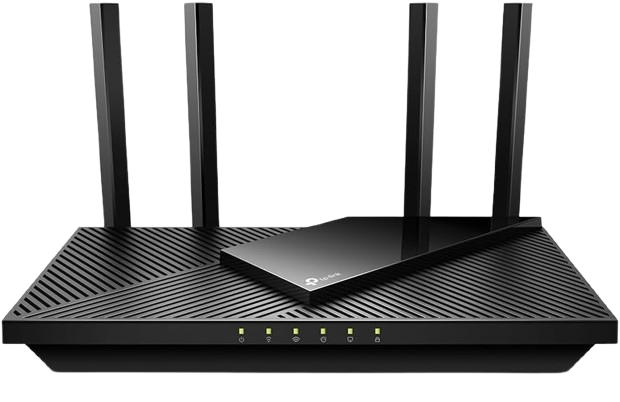
- Wi-Fi Standard: Wi-Fi 6 (802.11ax)
- Speed: Up to 1.8 Gbps (1200 Mbps on 5GHz + 574 Mbps on 2.4GHz)
- Ports: 4× Gigabit LAN, 1× Gigabit WAN
- Compatibility: Works with Alexa
- Special Feature: Certified for Humans – Easy setup and support
Performance and Experience
The Archer AX21 is a great mix of both performance and simplicity. It’s perfect for your medium home, providing ample wireless coverage for it. Whether you’re streaming, browsing or gaming on smart devices, it can keep up with every activity without lag.
Why It’s Great
The AX21 is the affordable, easy to install way to be ready for tomorrow. And it’s certified by Amazon for its “Certified for Humans” program — ideal if you’re not tech-savvy.
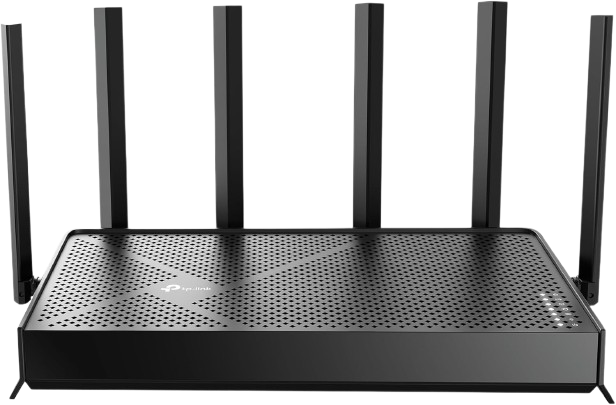
TP-Link Dual-Band BE3600 Wi-Fi 7 Router (Archer BE230)
The BE230 Archer is a source of great energy for the next generation. Featuring Wi-Fi 7, you enjoy faster throughput rates, near-zero latency and superior efficiency.
Specs at a Glance
- Speed: Up to 3.6 Gbps
- CPU: 2.0 GHz Quad-Core Processor
- Ports: 2× 2.5G + 3× 1G Ethernet Ports
- Antennas: 4 High-Gain Antennas
- Features: MLO, VPN, EasyMesh, HomeShield, Private IoT Network
Performance for Power Users
Whether you’re gaming in real time or streaming 8K footage, the BE230 delivers no lag and lightning-fast speeds! Its dual 2.5G ports are future-proofing your setup for years to come.
Why It’s Worth It
This is a router designed for Technology lovers and gaming fans who want performance and control. It’s the most sophisticated option of the three.
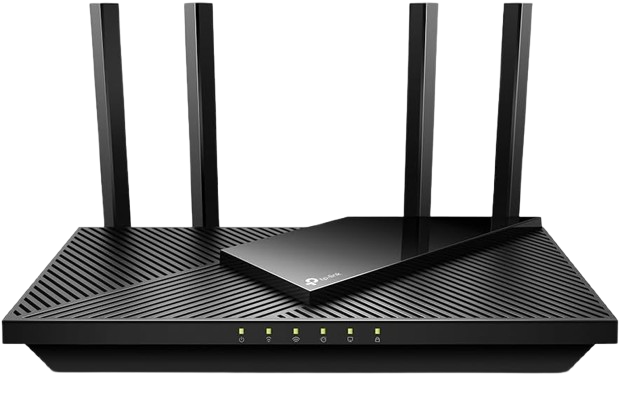
TP-Link Dual-Band AX3000 Wi-Fi 6 Router (Archer AX55)
Technical Overview
- Wi-Fi Standard: Wi-Fi 6
- Speed: Up to 3.0 Gbps
- Features: OFDMA, MU-MIMO, Beamforming
- Ports: 4× Gigabit LAN, 1× Gigabit WAN, 1× USB 3.0
- Security: HomeShield powered by TP-Link
Performance and Reliability
For balancing speed and coverage, the Archer AX55 is a star. Multiple users can simultaneously stream or game with few hiccups thanks to its state-of-the-art MU-MIMO and OFDMA technology.
Security Advantage
TP-Link HomeShield provides reliable network security, with a real-time network threat prevention and parental controls.
Why You’ll Love It
If you need a router to serve large families with lots of simultaneous users, smart TVs and gaming consoles, then the AX55 makes perfect sense.
How to Choose the Right Router for You
- Casual Users: Go with the AX21—it’s affordable and efficient.
- Families: The AX55 offers the right balance between speed and safety.
- Gamers/Pros: The BE230 is your ultimate beast for maximum performance.
Advice for Placing the Router for the Best Coverage
- For better signal Put your router closer to the center of your home.
- And keep it high (as in on a shelf).
- Don’t put it close to walls, metal or microwave.
A well-positioned router can improve coverage by 30 percent — not a lot with respect to the square footage, but something big in terms of results.
Security and Privacy Considerations
Your router is the guardian of your digital privacy. Always:
- Change default passwords
- Update firmware regularly
- Enable WPA3 encryption if available
- Keep remote administration off when not in use
Be prudent because these are small steps that can save you from big security risks.
The Future of Wireless Technology
Anticipate smarter routers — AI optimized, self-healing mesh networks, and auto device prioritization. Wi-Fi 8 has also appeared on the horizon, with claims of faster, more adaptive connections.
Common Router Myths Debunked
- Myth: “The more antennas, the faster you’ll go.”
Fact: Antennas increase directionality, not necessarily raw speed. - Myth: “It’s your speed from the Internet service provider (ISP) that matters most.”
Fact: The tech behind your router isn’t the only thing that matters.
Maintenance of the Router
Make sure to improve your router’s firmware for better performance assurance. I usually reboot it once a week, clean the cache and makes sure speeds are continuing.
Conclusion
The right router allows you to enjoy your hard-won bandwidth where you want it. Whether you need a basic model such as the TP-Link AX1800, balanced performance of the AX3000 or full-on best in class service from the BE3600, there is a TP-Link router perfect for you. Future-proof your investment with proven connectivity, and you’ll be set for many years to come.
FAQs
- Which router you select between Wi-Fi 6 and Wi-Fi 7?
Ans: Wi-Fi 7 is more advance than Wi-Fi 6. It’s faster in performance and simultaneous connections on multiple bands. It also has low latency application. - How do I understand if I need a new router?
Ans: If your internet is slow moving or inactive, if devices are repeatedly falling off your network or if it’s been four or more years since you last bought a router — time’s up. - Can a Wi-Fi 6 router be used with an older device?
Ans: Yes! Wi-Fi 6 routers could work seamlessly with older versions or devices easily. - When can we change the router for better performance?
Ans: It’s better to replace the router every 3 to 5 years to getting along with new technology and security updates. - Is the TP-Link BE3600 (Archer BE230) best for gaming?
Ans: Yes, Due to minimal latency, the TP-Link BE3600 (Archer BE230) is the best for gaming.